Seeing objects is the beginning
A useful alert depends on what the system retains, how it connects evidence, and how clearly the event is defined.
All eight infographics explore the same challenge: turning camera footage into an understanding of events while keeping the system fast and affordable. The easiest checks ask what is visible. More demanding checks ask who did what, in which order, and for how long.
- VLM · vision-language model
- AI that connects visual information with language. Some models match descriptions; others generate answers.
- Embedding / vector
- A list of numbers representing an image, object, text, or video—a compact numerical description.
- Encoder
- The part of a model that converts images or text into numerical representations.
- Visual tokens
- Pieces of visual information processed by a model, often originating from image patches.
- Tracker
- A component that tries to maintain the same object’s identity across frames.
- Detector / indicator
- A detector may mean an object-finding model or a configured alert scenario. An indicator may be one prompt or reference used by that scenario.
The star ratings, cost rankings, batch boundaries, and hardware capacities are illustrations, not measured guarantees. The explanations below distinguish useful concepts from architectural assumptions and simplified claims.
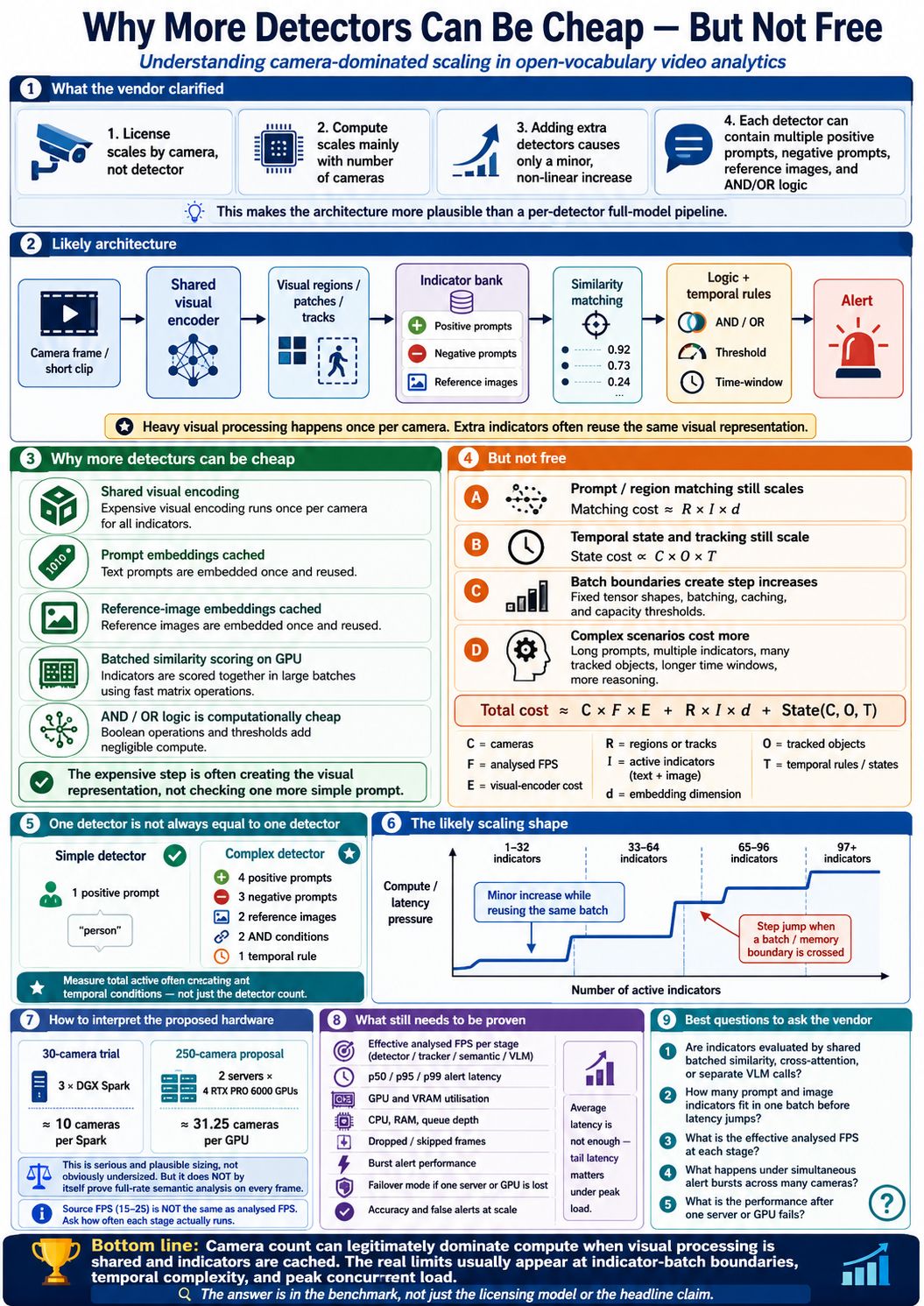
Why more detectors can be cheap—but not free
Several checks can reuse the expensive work already done on a camera’s images.
One camera might check for a person, a black bag, a vehicle near a doorway, and a bag remaining after someone leaves. A system may process each analysed frame or clip once, then reuse its visual representation for several checks. Text prompts and reference images may also be encoded in advance and reused.
Adding a simple check can therefore cost much less than adding another camera. Another camera supplies a continuous stream of new images. Here, “detector” appears to mean a configured scenario that can contain multiple prompts and conditions, rather than a separate AI model.
“Once per camera” means shared work for each analysed frame or clip, repeated as new video arrives. Query-dependent visual processing or separate generative-model calls may require additional work. Camera-based licensing alone does not prove the architecture.
What still grows?
- Comparisons between more prompts and more image regions.
- Object tracking, timers, and event histories.
- Simultaneous alerts and deeper interpretation of complex scenarios.
- Memory and extra processing batches when capacity boundaries are crossed.
C × F × E + R × I × d + State(C, O, T)
The first term represents cameras × analysed frames per second × visual-encoding cost. Matching grows with regions (R), indicators (I), and vector length (d). State also depends on tracked objects (O) and temporal rules or histories (T). This is a rough accounting model, not a capacity calculator.
The staircase graph shows how added indicators may fit into an existing batch until another batch or more memory is needed. The boundaries at 32, 64, and 96 indicators are illustrative. A scenario with several prompts, reference images, and timers is not equivalent to one simple “person” check.
What the hardware examples actually establish
| Example | Arithmetic | What remains unproven |
|---|---|---|
| 30-camera trial | 30 ÷ 3 DGX Spark systems = 10 cameras per system | Analysed frame rate, event accuracy, and alert delay. |
| 250-camera proposal | 250 ÷ 8 GPUs = 31.25 cameras per GPU | Performance during bursts and after a device failure. |
A camera could send 25 frames per second while the most expensive stage examines only 2. Ask how often each stage runs. A p95 alert delay is the delay within which 95% of measured alerts arrive; p99 covers 99%.
Cheap additional rules are plausible when processing is shared. Validate the actual configuration using analysed FPS, missed events, false alerts, tail latency, and failure behaviour under load.
View original infographic 01 · Detectors and cost
From images to video events
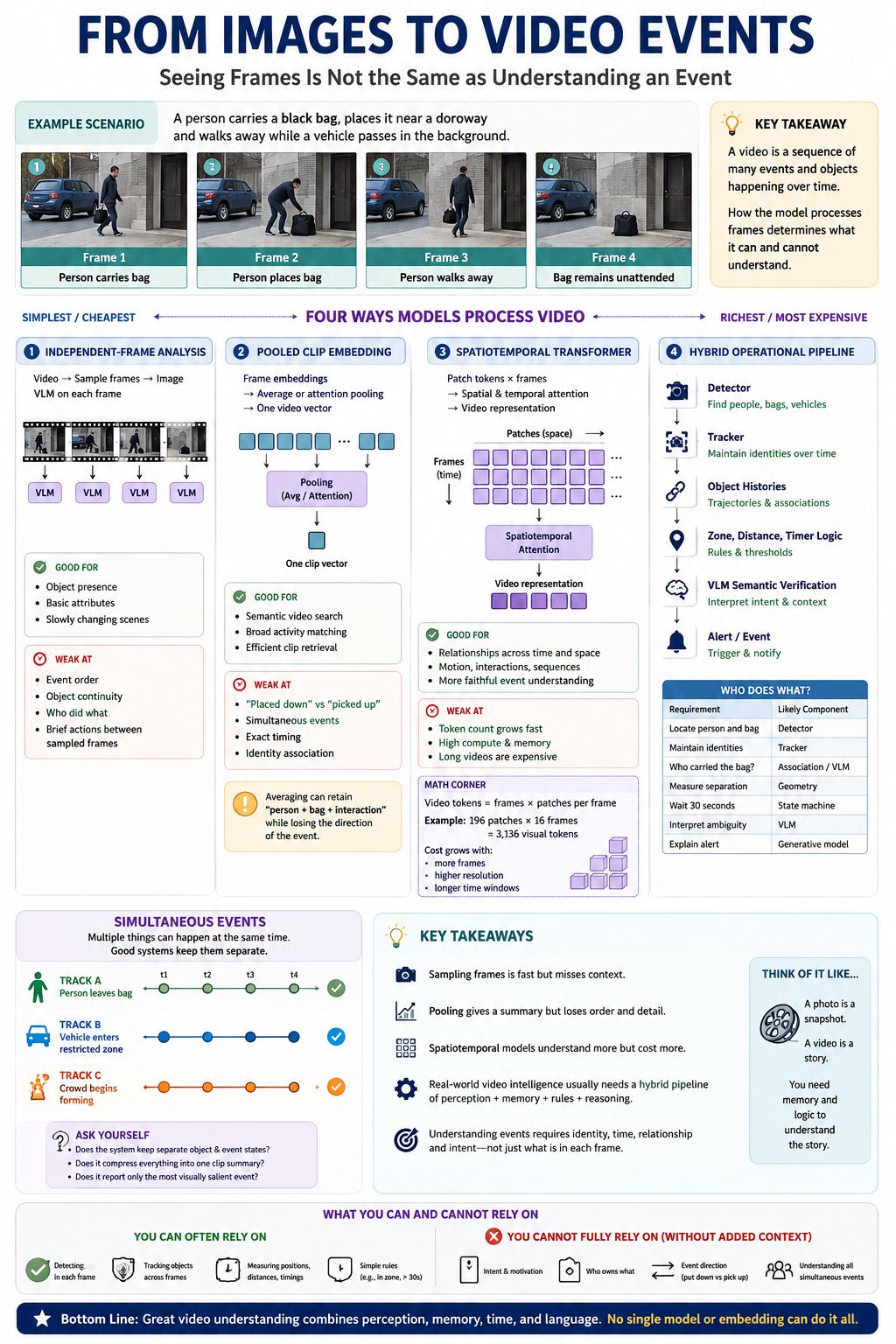
A person bending toward a bag could be putting it down or picking it up. The surrounding frames establish the action.
| Approach | How it works | Bag example |
|---|---|---|
| Independent frames | Examines selected images separately. | Finds a person and bag but may miss a brief action between samples. |
| Pooled clip embedding | Combines frame information into a compact clip summary. | May retain “person interacting with bag” while losing the exact sequence. |
| Spatiotemporal model | Processes relationships across image locations and time. | Can use changes between frames to distinguish putting down from picking up. |
| Hybrid pipeline | Combines detection, tracking, history, rules, and possibly a VLM. | Associates person and bag, observes separation, starts a timer, and raises an alert. |
If independently produced frame embeddings are simply averaged without encoding order, reversing the frames gives the same average. That summary cannot distinguish forward from reversed action. Other video models can process temporal order before producing a final summary.
The infographic’s 196 patches × 16 frames = 3,136 visual tokens shows why detailed video analysis can become expensive. Space-time attention processes information across both locations and moments, with cost depending on the design.
Research example: TimeSformer: Is Space-Time Attention All You Need for Video Understanding?
Keep simultaneous events separate
A person leaving a bag, a vehicle entering a zone, and a crowd forming may happen together. A useful system maintains separate event states rather than compressing everything into one prominent story.
“A bag remains stationary in this zone, and the person previously associated with it remains outside the specified distance for at least 30 seconds.”
This is something a system can attempt to measure. It does not establish the person’s intention or legal ownership. Tracking identities, measuring separation, maintaining time, and interpreting ambiguity are different responsibilities.
Reliable event detection needs evidence across time and a clear event definition. Recognising the objects in individual frames is only part of the task.
View original infographic 02 · Images to events
Accuracy potential versus efficiency
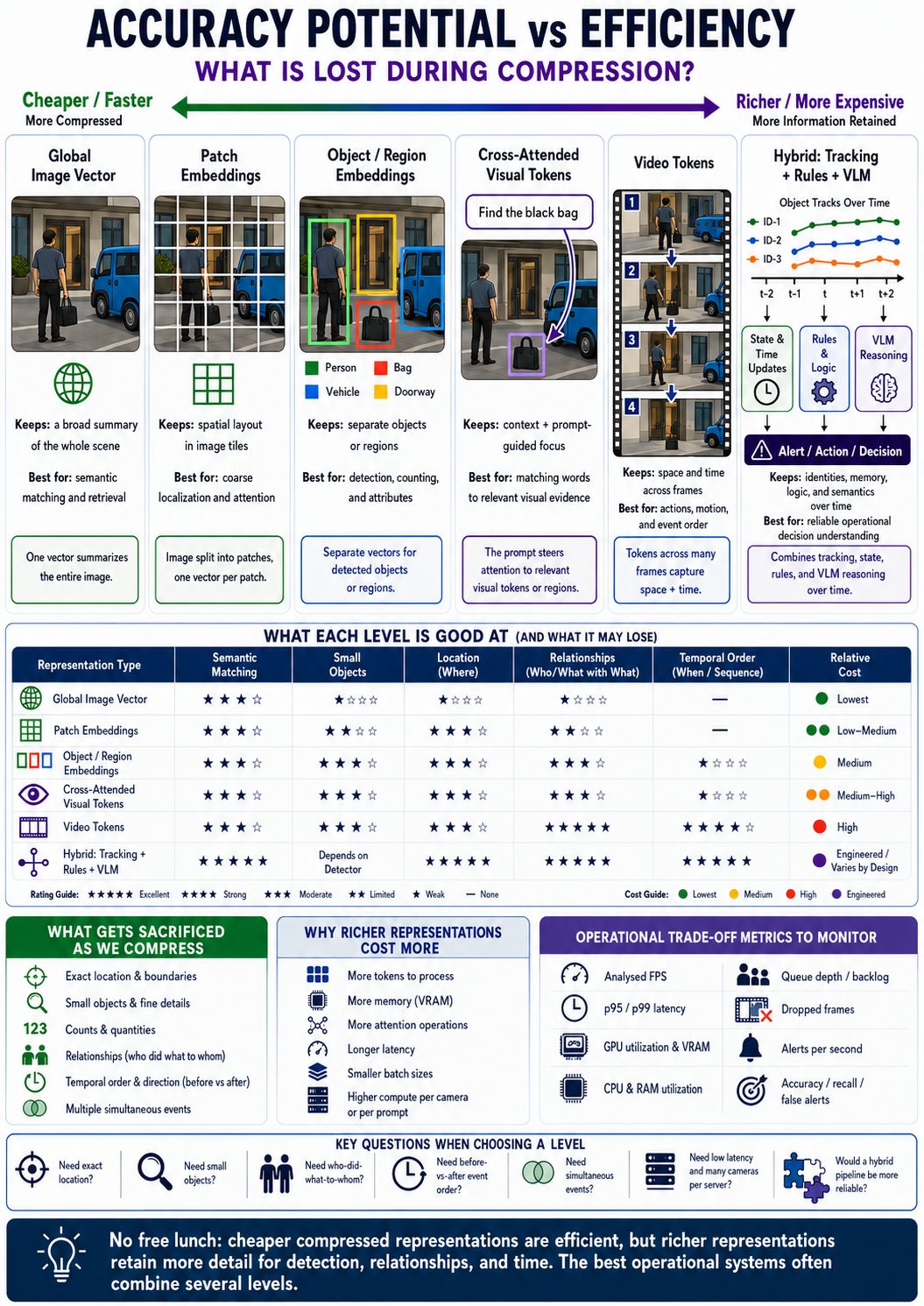
A compact summary is useful until the task depends on a detail that the summary loses.
“Person with bag near vehicle” is a concise scene description. It omits the exact location, which hand holds the bag, whether there are two bags, and what happened first. AI representations face a related trade-off.
| Representation | Information retained | Useful for |
|---|---|---|
| Global image vector | A whole-scene summary. | Broad semantic matching and retrieval. |
| Patch embeddings | Information associated with image tiles. | Spatial detail and attention to areas. |
| Object / region embeddings | Separate representations for selected items or areas. | Localisation, counting, and attributes. |
| Cross-attended tokens | Visual information processed in relation to words. | Finding evidence relevant to a query. |
| Video tokens | Information from multiple moments. | Motion and temporal relationships. |
| Hybrid system | Model outputs plus identities, stored state, and rules. | Operational decisions and alerts. |
“Find footage containing a vehicle” may only require broad scene information. “Identify which person left which bag and when” requires identities, relationships, and time. Richer processing often uses more memory, attention operations, and compute, potentially increasing latency or reducing batch size.
More tokens do not guarantee better accuracy. Training, visibility, resolution, and implementation matter. A hybrid system can also save computation by reserving expensive analysis for selected events.
Measure the trade-off
- Recall: how many real events are caught.
- False alerts: how often the system raises an incorrect alarm.
- Latency: how long alerts take, including p95 and p99 delays.
- Queue depth and dropped frames: whether processing is falling behind.
- GPU memory and utilisation, CPU and RAM: where capacity becomes constrained.
Choose a representation that preserves the evidence the task actually needs. Evaluate the full system’s accuracy and speed together.
View original infographic 03 · Accuracy and efficiency
Where the eyes and words meet
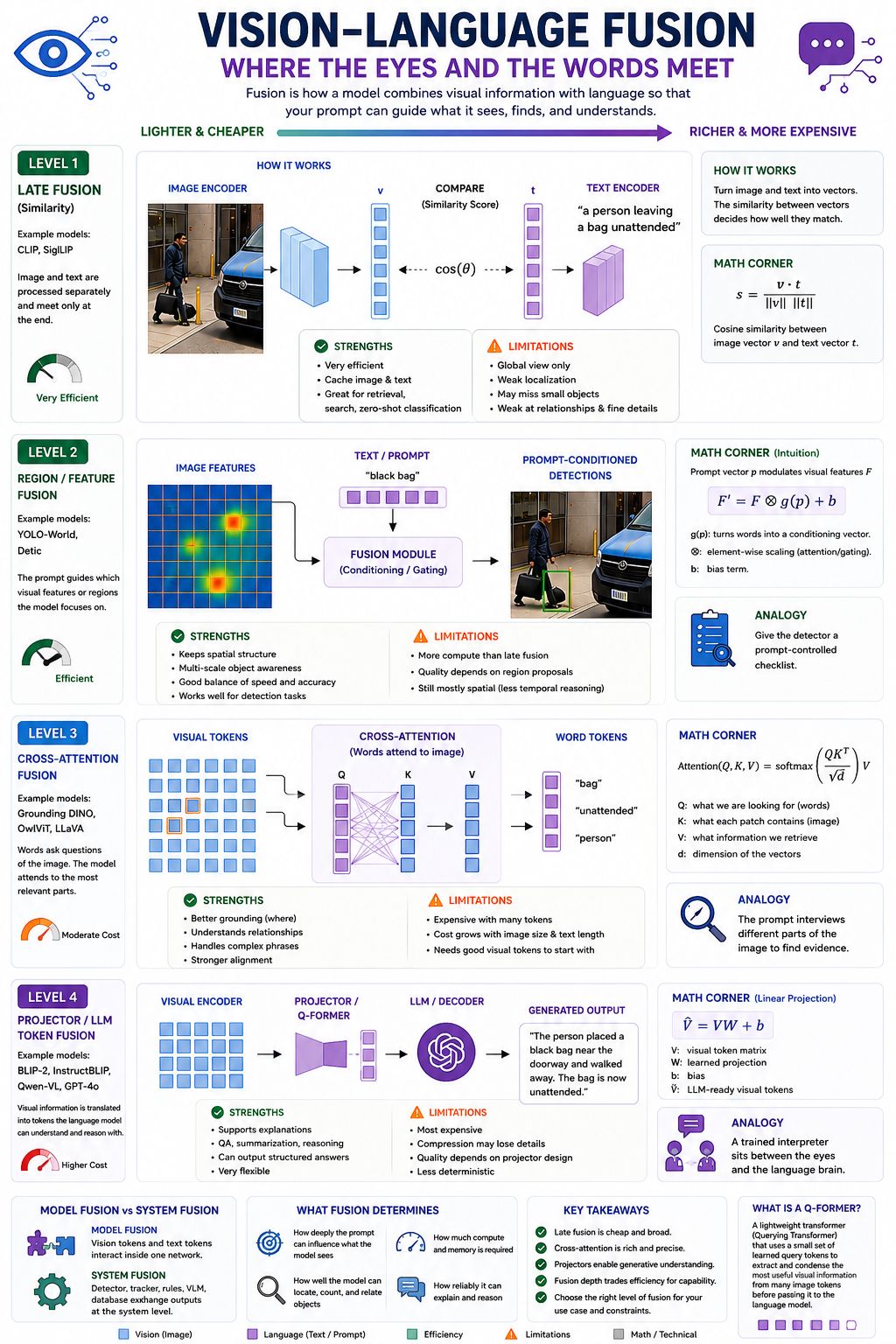
Fusion describes when and how a language prompt interacts with visual information.
| Mechanism | Plain-English explanation |
|---|---|
| Late fusion | Process image and text separately, then compare their numerical representations. |
| Region / feature fusion | Use the prompt to influence which visual signals or regions receive emphasis. |
| Cross-attention | Let information from words interact with information from different image areas. |
| Projector / language-model integration | Convert visual features into a form a language model can consume to generate answers. |
What the formulas mean
Cosine similarity measures how aligned two vectors are. It can compare an image with “person carrying a bag.” A score of 0.8 is not automatically an 80% probability that the description is true.
Feature conditioning changes the emphasis of visual features based on a prompt such as “black bag.” The graphic’s scaling-and-bias formula is an intuition, not a universal implementation.
Attention(Q, K, V) combines retrieved information: the query represents what is sought, keys provide matching information, and values supply what is retrieved. “Words questioning an image” is an analogy for numerical operations.
A projector maps visual features into a form the language model can use. BLIP-2 uses a Q-Former to extract a limited set of features and bridge an image encoder with a language model.
Research example: BLIP-2: Bootstrapping Language-Image Pre-training.
These levels are a teaching framework, not a strict ladder. Models can mix mechanisms. OWL-ViT is listed under cross-attention, but its original architecture explicitly avoids fusion between the image and text encoders and uses independently encoded queries. See the OWL-ViT paper.
Model fusion versus system fusion
Model fusion happens inside a model. System fusion happens when a detector, tracker, rule engine, database, and VLM exchange information. A dependable alert may depend as much on the latter as on the choice of model.
The way language interacts with vision affects reuse, localisation, flexibility, and cost. A fluent answer still needs supporting visual and temporal evidence.
View original infographic 04 · Vision-language fusion
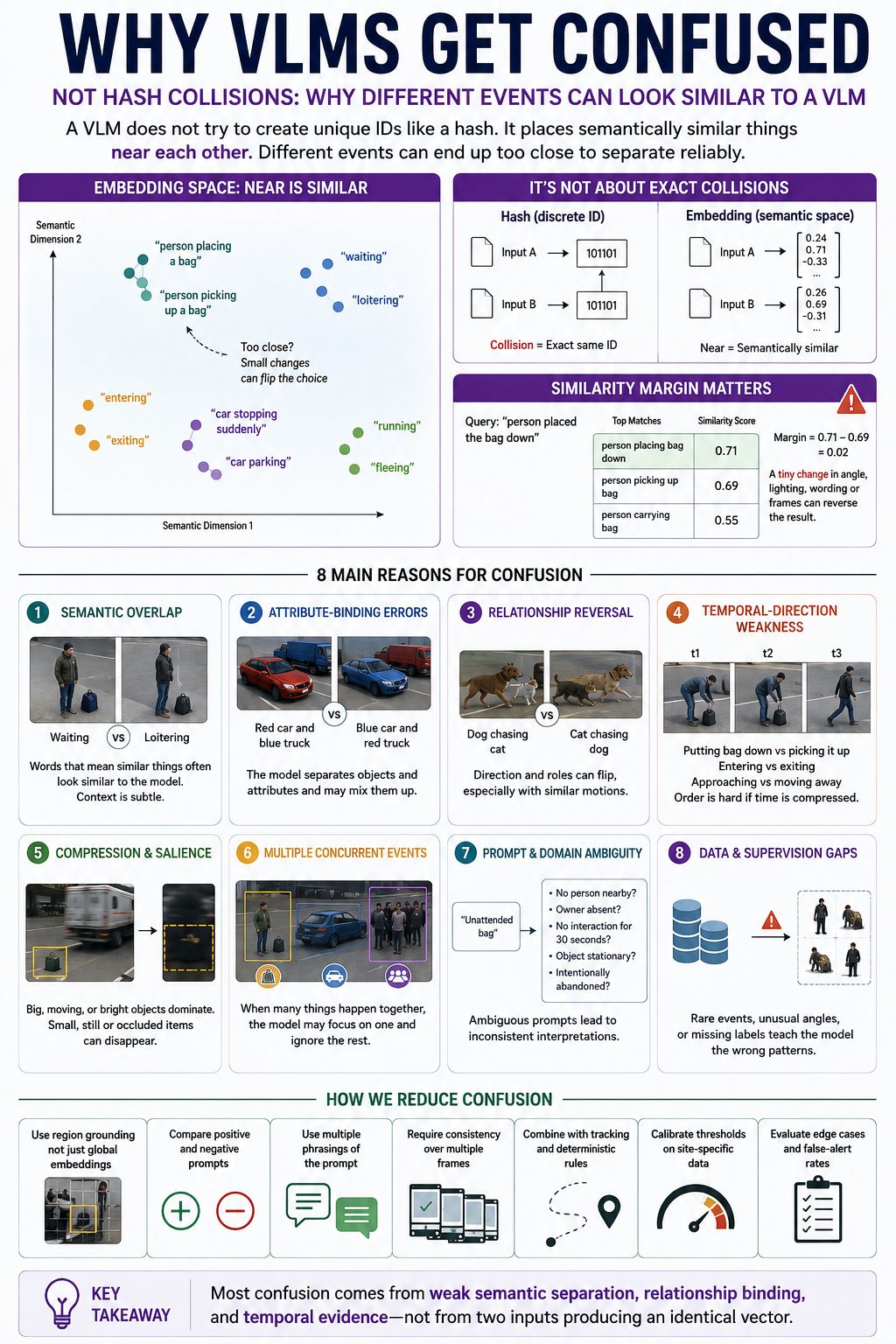
Why VLMs get confused
Different events can share many visual ingredients and end up with very similar scores.
An embedding captures useful similarity; it is not a unique identification code. “Putting down a bag” and “picking up a bag” share a person, bag, and bending posture. If the distinguishing evidence is missing, their representations may be difficult to separate.
Putting a bag down: 0.71 · Picking a bag up: 0.69 · Margin: 0.02
A change in lighting, angle, selected frames, or wording could reverse the ranking. These are similarity scores, not calibrated probabilities.
| Cause | What it means |
|---|---|
| Semantic overlap | “Waiting” and “loitering” can look alike without context. |
| Attribute binding | The model sees colours and vehicles but attaches a colour to the wrong vehicle. |
| Relationship reversal | It recognises participants but confuses who is doing what to whom. |
| Temporal direction | It confuses putting down with picking up, or entering with exiting. |
| Compression and salience | A large moving vehicle dominates while a small stationary bag is overlooked. |
| Concurrent events | One prominent event is described while another is missed. |
| Prompt ambiguity | “Unattended” lacks a clear distance, duration, or association rule. |
| Training gaps | There is insufficient useful training experience with the situation or camera conditions. |
Research has documented attribute, relationship, and order weaknesses in evaluated vision-language models. Their severity varies by model and task.
Research reference: When and why vision-language models behave like bags-of-words.
How to reduce confusion
Examine relevant regions, compare plausible alternative descriptions, try multiple phrasings, require consistency across time, combine tracking with explicit rules, and calibrate thresholds on actual site footage. Evaluate difficult examples and false-alert rates.
Positive and negative prompts can help separate alternatives, but do not guarantee reliable logical negation or eliminate ambiguity.
Most confusion here comes from weak separation, incorrect relationships, or missing temporal evidence—not an exact collision between two identical vectors.
View original infographic 05 · Why VLMs get confused
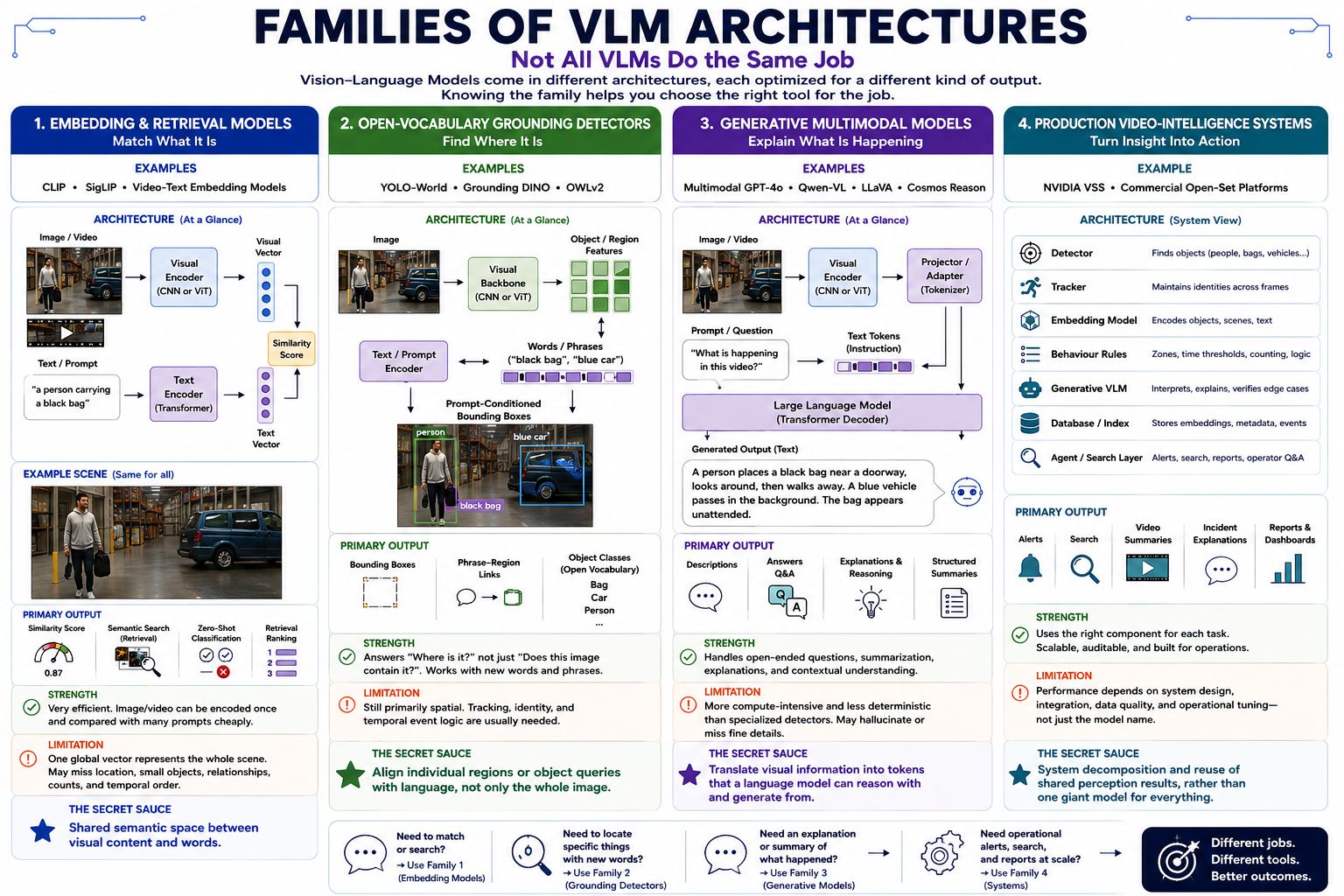
Families of VLM architectures
A search result, a bounding box, a description, and an operational alert are different outputs.
| Family | Main job | Bag example |
|---|---|---|
| Embedding / retrieval | Match or search. | Rank clips resembling “person carrying a black bag.” |
| Open-vocabulary grounding | Locate objects described with words. | Draw boxes around the person, bag, and vehicle. |
| Generative multimodal | Describe, answer, or explain. | “A person appears to place a bag beside the doorway.” |
| Production video intelligence | Coordinate components into a working service. | Provide an alert, timestamps, supporting footage, searchable records, and an explanation. |
Open vocabulary allows language to specify categories beyond a narrow fixed detection label list. It does not mean every concept someone writes can be detected reliably. YOLO-World is an example of language-connected object detection.
Research example: YOLO-World: Real-Time Open-Vocabulary Object Detection.
The fourth family is an entire system, rather than one model architecture. It can include a detector, tracker, embedding model, behavioural rules, a generative VLM, databases, and search or reporting tools. NVIDIA’s VSS architecture combines ingestion, visual processing, captions, indexing, and retrieval, with optional computer-vision metadata.
System example: NVIDIA VSS architecture documentation, version 2.3.0.
Choose components based on the output needed. Success at describing a scene does not establish accurate localisation or dependable event alerts.
View original infographic 06 · Architecture families
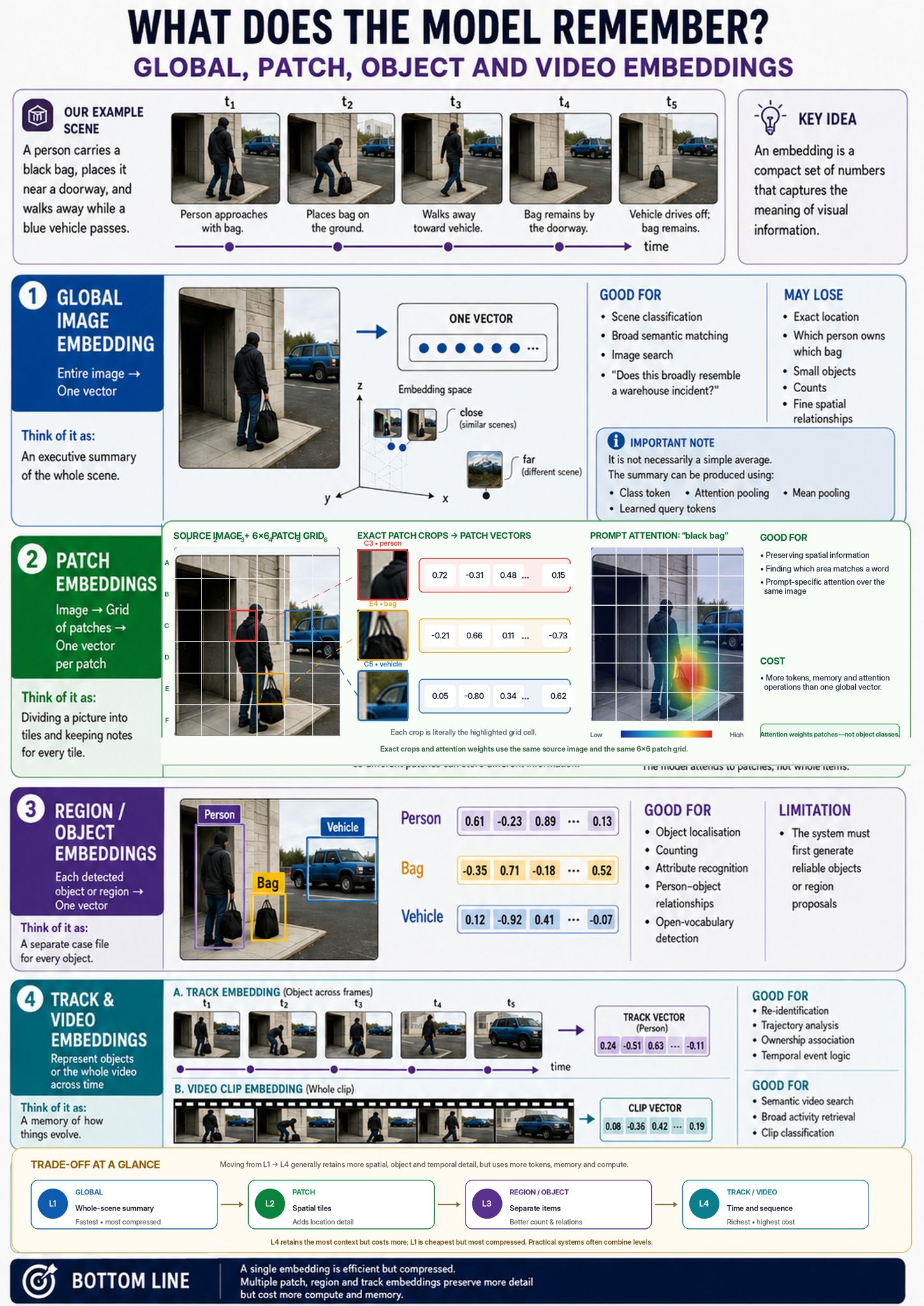
What does the model remember?
“Remember” means information retained in a representation—not necessarily permanent storage or learning from the footage.
| Representation | Think of it as | What it preserves |
|---|---|---|
| Global embedding | An executive summary. | Broad information about the whole scene. |
| Patch embeddings | Notes associated with image tiles. | More spatially organised visual information. |
| Object / region embeddings | A separate file for each selected item. | Information about individual objects or areas. |
| Track / video embeddings | A summary across time. | Information about an object’s appearances or a whole clip. |
Three distinctions matter
A global embedding is not necessarily an average. A model can learn how to combine information into its summary using pooling, class tokens, or learned queries.
Patches are not objects. One tile may contain part of a bag and part of the pavement. Later processing can mix information across patches, so a patch token need not remain an isolated description of its original tile.
A track embedding is not a track history. An embedding may help recognise an object’s appearance. A history records positions, timestamps, associations, and state changes. One vector does not automatically preserve a full trajectory, establish ownership, or implement a 30-second timer.
Object and region representations also depend on generating useful regions or detections in the first place. A missed bag cannot be recovered merely by keeping a separate vector for every object that was successfully detected.
This section explains the forms of representation. Section 03 explains their information and cost trade-offs. Practical systems often combine several forms with explicit history.
View original infographic 07 · Model memory and embeddings
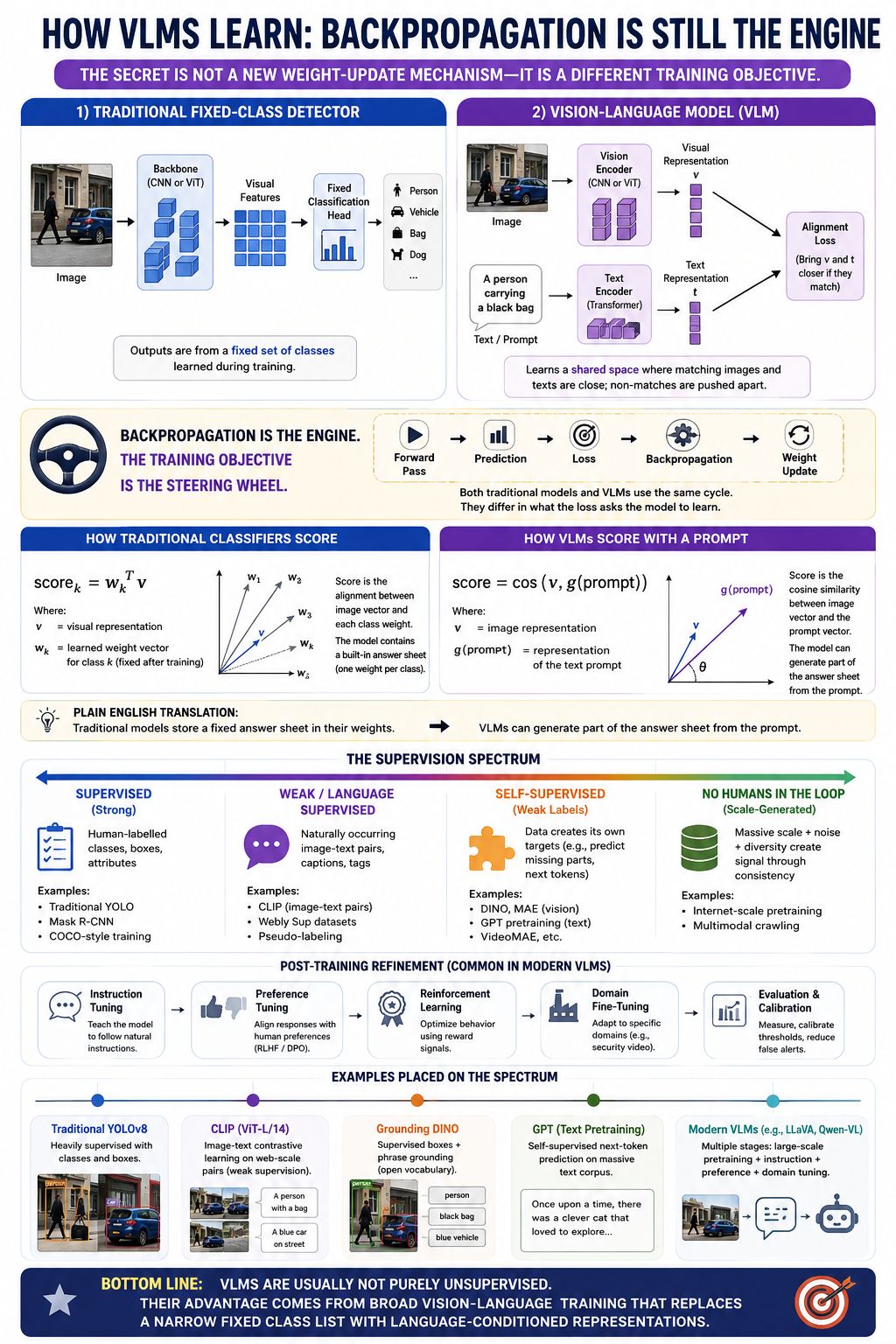
Backpropagation is still the engine
The learning mechanism is familiar. The training objective determines what the model is encouraged to learn.
- Forward pass: process an example and produce a prediction.
- Loss: measure how that prediction differs from the training objective.
- Backpropagation: calculate how trainable parameters contributed to the loss.
- Weight update: an optimiser changes those parameters.
A traditional fixed-class detector might learn to distinguish person, car, bag, and dog while also learning their locations. A CLIP-style model learns from image–text pairs so matching images and descriptions receive compatible representations. Text descriptions can then define new classification queries without a separately trained classifier for each query.
Research reference: CLIP: Learning Transferable Visual Models From Natural Language Supervision.
A fixed classifier has learned scoring parameters for its configured classes. A language-based model can derive a scoring representation from supplied text. Changing the prompt usually changes the query, not the trained weights. Prompting is not automatically retraining.
Where training signals come from
- Supervised learning: people provide labels, bounding boxes, or other targets.
- Language supervision: captions or associated text provide a learning signal.
- Self-supervised learning: targets are constructed from the data itself, such as predicting missing content.
- Post-training: instruction tuning, preference training, reward-based learning, or domain fine-tuning can refine behaviour. Evaluation and calibration measure performance and adjust operating thresholds.
The alignment diagram mainly describes embedding-style VLMs. Generative VLMs can also learn by predicting text conditioned on images and through other objectives; some components may remain frozen.
“No humans in the loop” is too absolute. Automatically collected data may still include human-written captions, filtering decisions, and other forms of supervision. These methods are not a strict single spectrum.
Broad vision-language training enables flexible language queries. It does not make the model purely unsupervised or guarantee understanding of every event described by a prompt.
View original infographic 08 · How VLMs learn
From learned capabilities to a useful alert
The eight ideas connect into a chain of responsibilities.
Build visual and language capabilities.
Retain evidence at the necessary level of detail.
Match descriptions or interpret relevant evidence.
Connect objects, actions, and observations.
Define zones, separation, and duration.
Produce alerts and evaluate accuracy, delay, and cost.
For the bag example, the decisive demonstration is whether the system consistently identifies the same bag, the associated person, the correct action sequence, and the required unattended duration—while meeting acceptable alert delays and false-alarm rates across the intended camera count.
Useful questions for an evaluation
- Which stages share visual processing, and which need additional model calls?
- What is the actual analysed frame rate at each stage?
- How are identities, simultaneous events, distance, and time maintained?
- What happens with small objects, occlusion, darkness, and ambiguous actions?
- What are missed-event and false-alert rates on representative footage?
- What happens during simultaneous alert bursts or a server/GPU failure?
Sources & further reading
The explanations accompany the eight supplied infographics. These primary references support the architectural examples and corrections; they do not validate the infographic’s proposed hardware capacity.
- CLIP · Learning Transferable Visual Models From Natural Language Supervision — image–text learning and language-defined classification.
- TimeSformer · Is Space-Time Attention All You Need for Video Understanding? — attention across space and time.
- OWL-ViT · Simple Open-Vocabulary Object Detection with Vision Transformers — independently encoded queries and object detection.
- BLIP-2 · Bootstrapping Language-Image Pre-training — Q-Former and vision-to-language integration.
- When and why vision-language models behave like bags-of-words — attribution, relation, and order evaluation.
- YOLO-World · Real-Time Open-Vocabulary Object Detection — language-connected detection.
- NVIDIA VSS · Architecture, version 2.3.0 — an example of an integrated video-intelligence system.